
Introduction: The Hidden Cost of Digital Overload
Our screens promise connection and efficiency, yet most people feel constantly distracted, overwhelmed, and mentally exhausted. Digital minimalism offers a deliberate philosophy to combat this digital fatigue. By choosing to align your technology use with your core values, you intentionally eliminate digital clutter—from relentless notifications to bloated file storage—and restore your capacity for deep focus https://fibozin.com.
Key Takeaways: Most Important Points
- Intentionality over Exclusion: Digital minimalism is not about abandoning technology, but using tools with strict purpose.
- Notification Control: Disabling non-essential alerts immediately recovers significant mental bandwidth.
- Streamlined Workspaces: Clean digital environments directly reduce cognitive load and daily stress.
- Sustained Focus: Reclaiming your attention span requires regular digital detoxes and defined offline boundaries.
What Is Digital Minimalism and Why Does It Matter?
At its core, digital minimalism is a framework where you clear away low-value digital distractions so that high-value activities can thrive. Rather than reacting to every ping, badge, or pop-up, a minimalist digital lifestyle forces you to ask: Does this app, file, or habit serve a clear purpose in my life?
[Internal Link: Read our comprehensive guide on productivity frameworks for remote work]
When you implement digital minimalism, you lower your cognitive load. Studies show that continuous app switching splits attention, taking up to 23 minutes to regain focus after a single interruption https://fibozin.com.
4 Actionable Steps to Declutter Your Digital Life
[Image Placeholder 1]
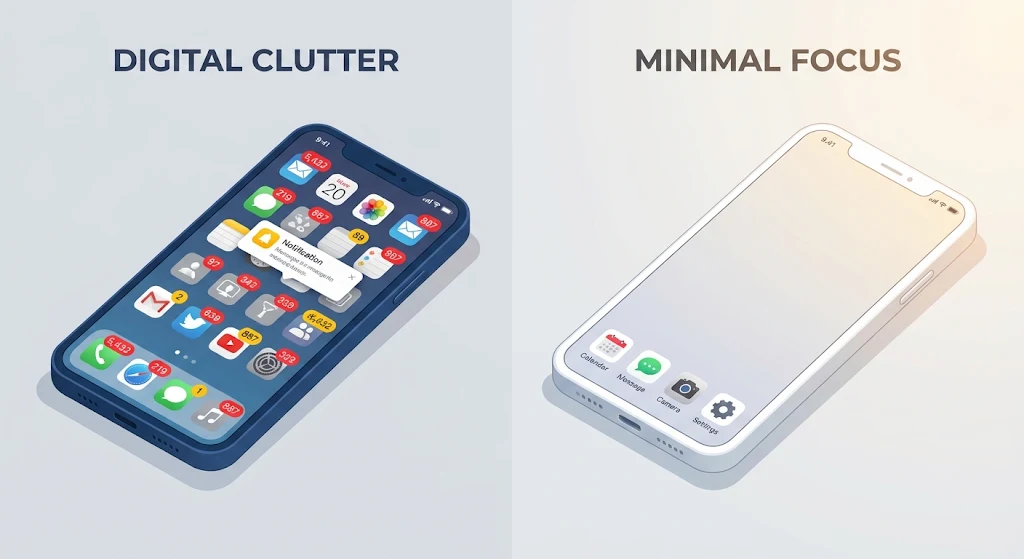
1. Perform a Mobile App Audit
Your smartphone is ground zero for attention capture. Start by deleting any app you haven’t used in the past 30 days. For social media and news platforms, remove the mobile apps entirely and access them only via desktop browsers to introduce natural friction https://www.atlassian.com.
- Keep your home screen to one page of essential utility tools (Maps, Camera, Calendar).
- Turn off all notifications except direct human communications (Calls, Messages).
2. Streamline Your Desktop and File Storage
A messy desktop creates immediate subconscious friction when you open your computer.
- Desktop Zero: Store no loose files on your primary desktop view.
- Folder Architecture: Create four root folders: Projects, Archive, Personal, and Admin.
- Cloud Hygiene: Delete duplicate downloads and clear temporary caches weekly.
Reclaiming Your Attention: Daily Behavioral Habits
[Image Placeholder 2]

3. Establish Digital Boundaries and Friction
Habitual checking is driven by low resistance. Introducing small barriers helps break automatic behavior loops:
- Keep Devices Away From Bed: Use a traditional alarm clock to protect the first and last hour of your day.
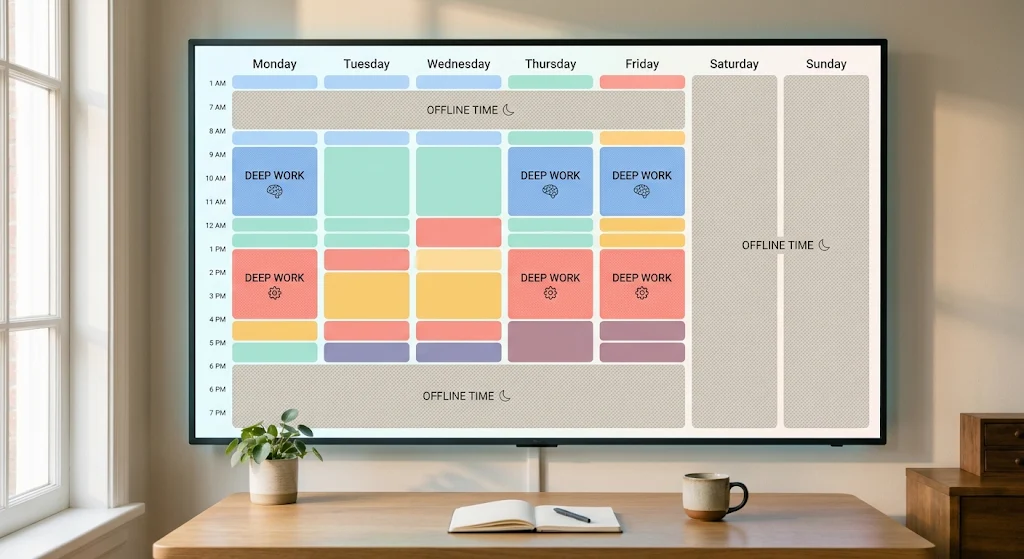
- Implement Batch Processing: Check emails and messages at designated time blocks rather than continuously throughout the day.
- Use Focus Modes: Set automatic focus filters during core deep-work hours.
[External Link: Explore research from the American Psychological Association on the cognitive impacts of multitasking]
4. Practice Regular Digital Detoxes
Dedicate one period per week—such as Sunday morning—to remain completely disconnected from screen-based tech. Use this period for offline hobbies, physical movement, and uninterrupted face-to-face conversations.
[Image Placeholder 3]
Conclusion
Adopting digital minimalism is not a one-time cleanup project; it is an ongoing practice of intentional living. By actively pruning digital noise, turning off non-essential notifications, and protecting your focus, you regain control over your time, attention, and mental clarity. Start small by decluttering your mobile home screen today, and build your digital environment around what truly matters.
Frequently Asked Questions (FAQs)
What is the main goal of digital minimalism?
The primary goal of digital minimalism is to optimize your relationship with technology by intentionally selecting tools that support your core values, while stripping away low-value digital noise and distractions.
How do I practice digital minimalism without deleting essential work apps?
Practicing digital minimalism does not require deleting work-critical applications. Instead, set clear boundary windows for checking these tools, turn off passive notifications, and use focus modes so work tools do not intrude on personal hours.
How often should I perform a digital declutter?
Perform a quick weekly maintenance routine to clear downloads and temporary files, alongside a thorough quarterly audit of your apps, subscriptions, and cloud storage systems.
Leave a Reply