Introduction Upgrading to a programmable or smart climate control system represents one of the most cost-effective strategies for optimizing residential energy usage, enhancing thermal comfort, and integrating modern home automation…
Introduction
Upgrading to a programmable or smart climate control system represents one of the most cost-effective strategies for optimizing residential energy usage, enhancing thermal comfort, and integrating modern home automation https://fibozin.com. However, transitioning from a traditional wall unit to an advanced connected model often presents technical friction—most notably when interpreting complex low-voltage HVAC wiring configurations.
Whether deploying a Nest Learning Thermostat, Ecobee Smart Thermostat Premium, or Honeywell Home T9, this smart thermostat installation guide provides a comprehensive, field-tested technical overview. From deciphering control board terminals and retrofitting systems lacking continuous 24VAC power to diagnosing post-installation operational anomalies, this guide ensures a seamless, safe, and fully compliant installation.
Key Takeaways
Safety First: Always isolate power to both the heating and cooling equipment at the main circuit breaker panel before interacting with any thermostat wiring or control boards.
The Critical C-Wire: Smart thermostats require a dedicated 24VAC common wire (C-wire) to provide continuous power for Wi-Fi radios and color displays; systems lacking a C-wire require a Power Extender Kit (PEK) or C-wire adapter.
Document Existing Wiring: Capture high-resolution reference photographs of all terminal block connections prior to disconnecting legacy hardware.
Voltage Verification: Ensure compatibility by verifying that your system utilizes a low-voltage circuit ($24\text{ VAC}$); line-voltage electric baseboard heaters ($120\text{V}/240\text{V}$) require specialized line-voltage controllers.
Pre-Installation: Safety Precautions and Tools Required
Before initiating the installation process, assemble the necessary diagnostic tools and execute foundational safety protocols. While working with low-voltage HVAC control circuits carries low risk of direct electrical shock, improper handling or accidental wire shorts can easily blow the low-voltage fuse on the main HVAC furnace control board.
Required Equipment:
Precision hand tools (slotted and Phillips screwdrivers)
Non-contact voltage detector or digital multimeter (DMM)
Terminal wire labels or painters tape
Wire strippers/crimpers
Drywall anchors, mounting screws, and a bubble level
Step 1: Isolate Electrical Power
Locate your home’s main breaker panel and switch off the dedicated circuit breakers powering both the indoor air handler/furnace and the outdoor condenser unit https://www.atlassian.com. To verify complete power disconnection, attempt to manually initiate a heating or cooling call from your legacy thermostat. If the system fails to engage after two minutes, electrical power is safely de-energized.
[Internal Link: Check out our complete guide to home network security for smart devices]
Understanding HVAC Wiring Color Codes and Terminal Labels
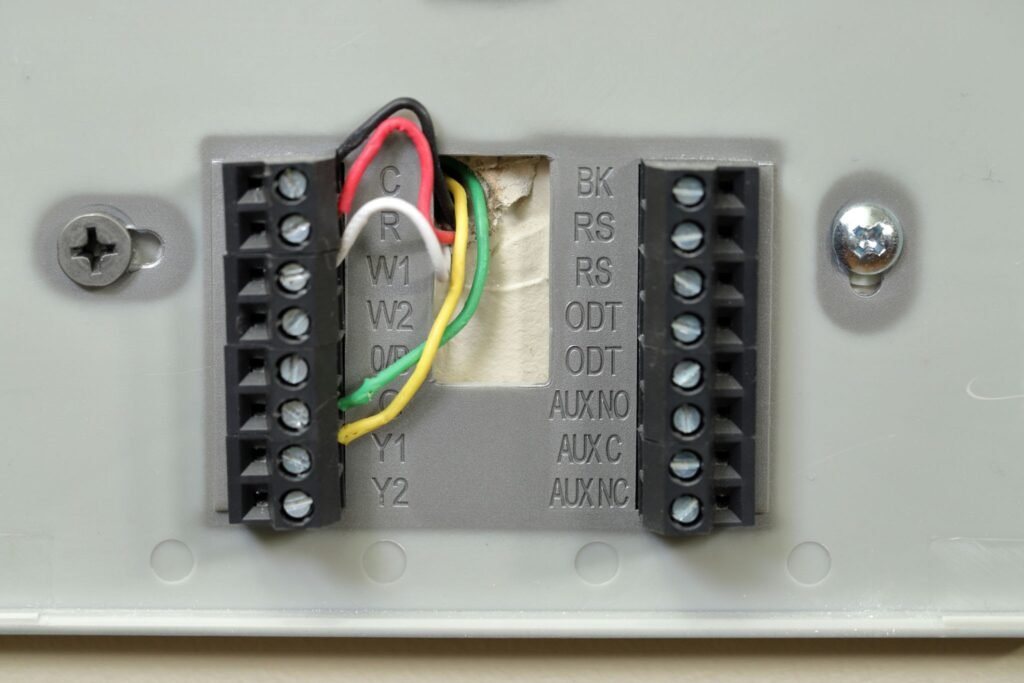
While industry standards prescribe specific color coding for low-voltage conductor insulation, field installations frequently deviate from standard conventions. Always prioritize terminal letter designations over wire jacket colors.
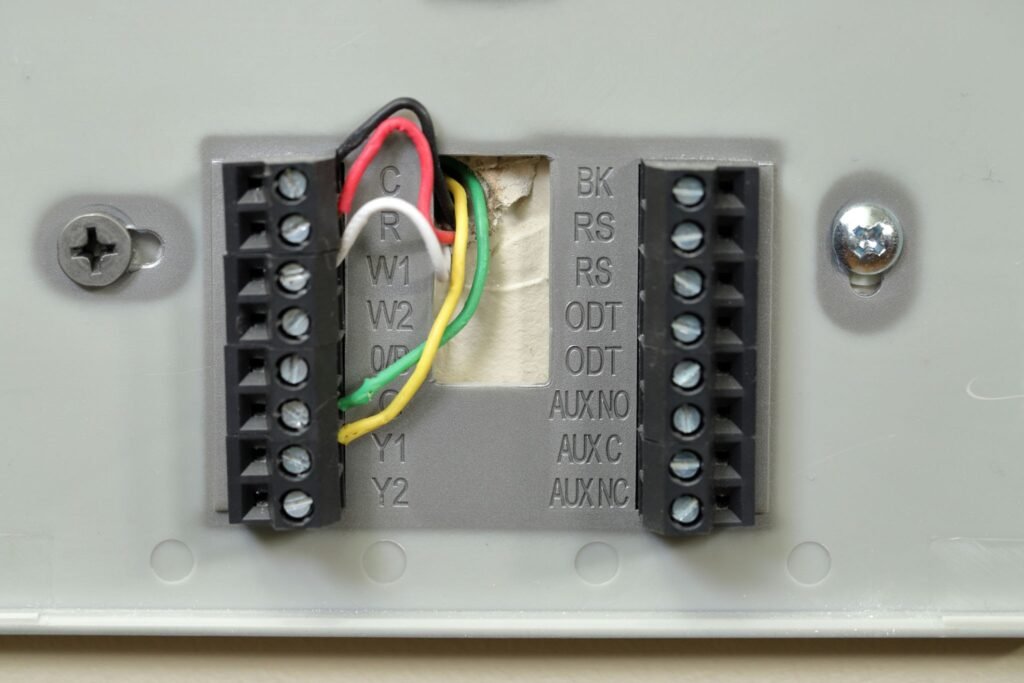
Close-up of thermostat wiring on wall, with colored wires
Standard HVAC Terminal Reference:
R / Rc / Rh (Red): 24VAC transformer power supply ($Rc$ for cooling transformer, $Rh$ for heating transformer in dual-transformer systems).
C (Blue or Cyan): Common wire; completes the $24\text{ VAC}$ circuit to power the smart thermostat’s internal electronics and Wi-Fi chip set.
W / W1 (White): Primary heating stage signal line.
Y / Y1 (Yellow): Single-stage cooling compressor contactor signal line.
G (Green): Indoor blower fan relay signal line.
O / B (Orange or Dark Blue): Reversing valve control line for heat pump configurations ($O$ energizes on cooling; $B$ energizes on heating).
Step-by-Step Smart Thermostat Installation Process
[Power Off HVAC] ➔ [Label Existing Wires] ➔ [Remove Old Baseboard] ➔ [Mount New Backplate] ➔ [Connect Wires / Adapter] ➔ [Snap Thermostat & Restore Power]
Step 1: Label and Disconnect Legacy Wires
Detach the legacy thermostat faceplate to expose the backplate wiring block. Affix identification labels to each conductor corresponding strictly to the terminal letter it occupies—ignoring wire color. Unfasten the terminal screws, carefully release the conductors, and secure them (e.g., wrapping them around a pencil) to prevent them from receding behind the drywall opening.
Step 2: Level and Mount the New Baseplate
Thread the labeled wires through the wire entry aperture of the new smart thermostat backplate. Align the plate against the wall using an integrated or external bubble level, mark the mounting points, insert appropriate drywall anchors, and secure the baseplate firmly to the wall substrate.
How to Install a C-Wire Adapter (Power Extender Kit)
If your existing wall junction contains only four conductors (R, W, Y, G) without a C-wire, install the manufacturer-supplied Power Extender Kit (PEK) directly at the furnace control board.
Expose the Furnace Control Board: Remove the access panels on your furnace or air handler to locate the integrated furnace control (IFC) board.
Terminal Mapping: Disconnect the existing G and Y leads from the board and terminate them into the corresponding inputs on the PEK module.
Connect PEK Harness: Connect the output harness from the PEK directly to the R, G, Y, W, and C terminal screws on the furnace control board.
Thermostat Re-wiring: At the thermostat wall plate, utilize the reconfigured G-wire as the primary C-wire connection according to the PEK setup instructions.
[External Link: Learn more about official C-wire adapter compatibility from the ENERGY STAR smart thermostat guide]
Common Fixes for Smart Thermostat Issues
If operational issues arise post-installation, consult the technical troubleshooting procedures below:
1. Thermostat Display Inoperative (No Power)
Root Cause: Open circuit due to an unseated door interlock switch, blown 3A/5A control board fuse, or improperly seated conductor pins.
Resolution: Ensure stripped conductor ends are exposed to approximately $\frac{3}{8}\text{ in.}$ ($10\text{ mm}$) and fully seated into spring terminals. Verify that the blower compartment access door is completely closed to engage the safety door switch.
2. System Delivers Heat During Cooling Calls (Heat Pump Systems)
Root Cause: Incorrect software configuration of the reversing valve logic ($O/B$ terminal setting).
Resolution: Access the advanced system setup menu within the thermostat interface or companion app and toggle the O/B valve logic. Systems manufactured by Rheem/Ruud default to energizing in heating mode (B), whereas systems from Carrier, Trane, and Lennox energize in cooling mode (O).
3. Intermittent Wi-Fi Disconnections and Network Drops
Root Cause: Insufficient power delivery caused by “power stealing” configurations, or 5GHz band incompatibility.
Resolution: Confirm that your wireless router broadcasts an active 2.4 GHz network, as most thermostat Wi-Fi modules do not support 5 GHz protocols. Measure the AC voltage potential across terminals R and C using a multimeter; the reading should consistently fall between $20\text{ VAC}$ and $30\text{ VAC}$.
Frequently Asked Questions (FAQs)
Can I follow a smart thermostat installation guide if I have standard baseboard heaters?
No. High-voltage electric baseboard heating systems utilize line-voltage power ($120\text{V}$ or $240\text{V}$), whereas standard smart thermostats operate exclusively on low-voltage ($24\text{VAC}$) control circuits. Connecting a low-voltage smart thermostat to line-voltage wiring will instantly destroy the device and poses a serious electrical hazard. Always select a smart controller explicitly rated for line-voltage applications.
What happens if I connect my smart thermostat without a C-wire?
Attempting to operate a display-rich smart thermostat without a C-wire forces the device to rely on “power stealing” (drawing micro-currents from the heating or cooling circuit while idle). This frequently results in erratic Wi-Fi drops, rapid lithium battery degradation, short-cycling of the compressor, or system chatter during seasonal shoulder months when the HVAC system remains dormant.
How do I know if my home already has an unused C-wire inside the wall?
Gently pull the wiring bundle outward from the wall cavity behind the old thermostat baseplate. Installers frequently pull multi-conductor cable (such as 18/5 or 18/8) and wrap unused wire leads (often blue, black, or orange) around the outer cable jacket. If an unused lead is present, verify that its opposite end is physically terminated to the C terminal on the furnace control board prior to connecting it at the wall.
Final Thoughts
Following this structured smart thermostat installation guide ensures a smooth transition to an automated home climate system. By systematically turning off system power, accurately labeling field wiring, retrofitting C-wire adapters where necessary, and properly configuring software settings, you secure efficient HVAC performance and maximum energy savings.

Leave a Reply